Oct 30, 2025
How to Define Your Capability Profile for Tender Matching: Avoid ‘Too Broad, Too Narrow’ Fits

One of the most important steps in setting up TenderBot IO is defining your capability profile. This profile determines how TenderBot matches tenders to your business.
Done well, it ensures you see only the most relevant opportunities. Done poorly, it can flood you with irrelevant tenders—or worse, filter out the ones you could actually win.

In this article, we’ll show you how to strike the right balance when defining your capability profile, and how to avoid the classic mistake of going too broad or too narrow.
What Is a Capability Profile?
Your capability profile is the set of criteria that TenderBot IO uses to evaluate and score tenders against your business. It typically includes:
- Industry focus (e.g. construction, IT services, healthcare supplies)
- Keywords describing your products and services
- Regions and countries where you can realistically operate
- Special qualifications or certifications you hold
TenderBot uses this information to calculate a match score for each tender, so you can prioritize the ones that best fit your company.
Reminder During Onboarding
When you first sign up, TenderBot IO gives you a head start:
- By entering your company website URL, TenderBot will try to extract relevant capabilities, industries, and keywords automatically.
- This pre-filled information is a useful shortcut, but it’s not perfect—every business is unique.
👉 Always review and refine the pre-filled data during onboarding.
Adjust services, regions, and keywords to make sure the profile reflects your business accurately.
This step ensures you don’t get overwhelmed with irrelevant tenders or miss out on valuable ones.
The Danger of Going Too Broad
Some companies make the mistake of setting their criteria overly broad.
- Example: A construction firm selects all of “infrastructure” without narrowing down to building types or regions.
Result:
- Dozens of irrelevant tenders appear daily.
- Teams waste hours filtering manually.
- The true opportunities get buried in noise.
⚠️ Broad profiles create “false positives”—tenders that technically match but aren’t practical for your business.
The Risk of Going Too Narrow
On the other hand, defining your profile too narrowly can also hurt.
- Example: An IT consultancy only selects “cloud migration” in a single region.
Result:
- Too few tenders are matched.
- High-value opportunities outside those exact filters are missed.
- Growth potential is limited because the company sees only a fraction of the market.
⚠️ Narrow profiles create “false negatives”—missing out on tenders you could win.
How to Find the Right Balance
The key is to start focused but flexible. Here are some practical steps:
1. Use Your Website for Auto-Extraction
When onboarding with TenderBot IO, start by entering your company website URL. TenderBot automatically extracts relevant keywords, industries, and services to pre-fill your profile.
⚠️ Important: This is only a starting point. Double-check and adjust the extracted data to make sure it reflects your true strengths.
2. Refine Industry and Services
Select the industries and services where you already have proven expertise, but don’t hesitate to include closely related areas.
✅ Good practice:
- A healthcare supplier including both “medical devices” and “consumables.”
❌ Bad practice:
- Selecting “all medical services” when you only sell equipment.
3. Define Geographic Reach Realistically
Focus on regions where you can actually deliver projects. If you’re a small firm, limit to national tenders first. If you have international capacity, expand gradually.
✅ Ask yourself: Can we deliver this project if we win?
4. Continuously Adjust Based on Analytics
TenderBot’s dashboard shows trends in what tenders are being matched. Use this data to adjust your profile:
- If you’re seeing too much noise, narrow your criteria.
- If you’re seeing too few tenders, expand gradually with broader keywords or new regions.
Best Practices for Capability Profiles
- Review quarterly: Keep your profile updated as your business evolves.
- Involve your bid team: They often know which opportunities are worth pursuing.
- Test neutral tenders: Sometimes “neutral” matches can reveal hidden opportunities.
- Always review pre-filled data: TenderBot IO’s auto-extraction is powerful, but fine-tuning ensures accuracy.
- Avoid extremes: Resist the temptation to go “everything” or “only one keyword.”
Conclusion
Your capability profile is the foundation of how TenderBot IO works for your business. By avoiding the extremes of too broad and too narrow, and by carefully reviewing the auto-filled information during onboarding, you’ll ensure the tenders you see are both relevant and actionable.
Take the time to set it up thoughtfully, review it regularly, and let TenderBot IO do the heavy lifting—so your team can focus on winning, not filtering.
👉 Start your free 4-Weeks trial and set up your capability profile in minutes.
Related Blogs
See All Blogs


Streamline EU Tendering
Automate discovery and evaluation of public contracts, so you focus on bids that truly fit.
Begin Your Free TrialEU, EEA & Switzerland

Austria

Belgium

Bulgaria

Croatia

Cyprus

Czech Republic

Denmark

Estonia
Austria
Belgium
Bulgaria
Croatia
Cyprus
Czech Republic
Denmark
Estonia

Finland

France

Germany

Greece

Hungary

Ireland

Italy

Latvia
Finland
France
Germany
Greece
Hungary
Ireland
Italy
Latvia

Lithuania

Luxembourg

Malta

Netherlands

Poland

Portugal

Romania

Slovakia
Lithuania
Luxembourg
Malta
Netherlands
Poland
Portugal
Romania
Slovakia

Slovenia

Spain

Sweden

Iceland

Liechtenstein

Norway

Switzerland
Slovenia
Spain
Sweden
Iceland
Liechtenstein
Norway
Switzerland
Serving all European Union, European Economic Area countries and Switzerland.
EU Buyer Reach

Tender Bot tracks every public buyer across Europe and funnels the most relevant.
Save Time and Make Better Tender Decisions
Focus on the tenders that matter—Tender Bot automatically screens EU-wide public opportunities, ranks them against your capabilities, and delivers a shortlist you can act on. Spend less time sifting through notices and more time crafting winning proposals.
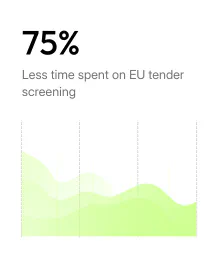

* Internal benchmark tests (July 2025) show that an experienced analyst needs about 15 minutes¹ to perform the first-pass qualification of a typical EU tender. With TENDERBOT IO, that same analyst can pre-qualify roughly 150 tenders in the same 15 minutes — around 10 tenders in ± 1 minute. This represents a reduction in screening time of well over 90 %. To stay conservative and cover variations in document length and working style, we therefore communicate “up to 75% time savings.
¹ Calculation assumes an average reading speed of ~2 minutes per A4 page and an average tender length of ~7 pages.